
代码块设置
代码高亮
替换主题文件
Hexo5.0开始自带prismjs 代码语法高亮的支持。如果你的博客中曾经安装过 hexo-prism-plugin 的插件,那么执行 npm uninstall hexo-prism-plugin 卸载掉它,否则生成的代码中会有 { 和 } 的转义字符。
然后,修改 Hexo 根目录下 _config.yml 文件中 highlight.enable 的值为 false,并将 prismjs.enable 的值设置为 true,主要配置如下:
highlight:
  enable: false
  line_number: true
  auto_detect: false
  tab_replace: ''
  wrap: true
  hljs: false
prismjs:
  enable: true
  preprocess: true
  line_number: true
tab_replace: ''matery默认的prismjs主题是 Tomorrow Night,如果想定制自己的主题,可前往 prismjs 下载页面 下载自己喜欢的主题 css 文件,然后将此 css 主题文件取名为 prism.css,替换掉 hexo-theme-matery 主题文件夹中的 source/libs/prism/prism.css 文件即可。
修改原主题
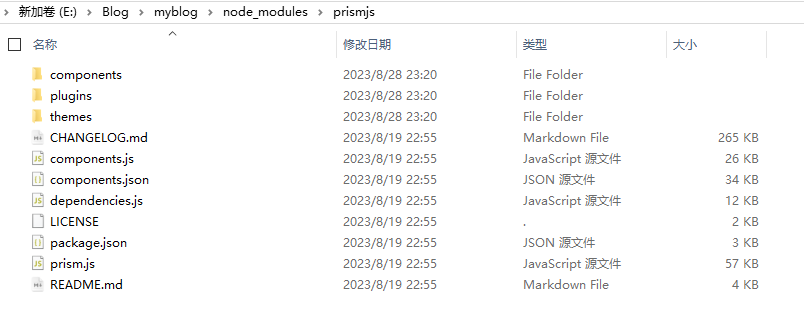
当然也可以在原有的高亮主题的上就行修改,在根目录下找到node_modules\prismjs\themes,还可以对代码主题进行其他的修改,比如行号,关键词的高亮,语言的显示等等,可自行研究修改。
添加折叠功能
代码块有时会有大段代码放上去,但又不想占据大量的位置,这时候就需要对代码块进行折叠。
有两种方式实现:
- 第一种:使用
hexo-sliding-spoiler插件零修改代码实现折叠功能 - 第二种:修改代码实现折叠效果
第一种
安装插件
npm install hexo-sliding-spoiler --save然后进行配置,根目录配置文件_config.yml中添加
plugin:
- hexo-sliding-spoiler最后进行美化,修改node_modules_hexo-sliding-spoiler@1.2.1@hexo-sliding-spoiler\assets\spoiler.css
.spoiler {
    margin: 20px 0;
    padding: 15px;
    border: 1px solid #E5E5E5;
    background: #E5E5E5;
    position: relative;
    clear: both;
    border-radius: 3px;
    transition:all .6s
}

.spoiler .spoiler-title {
    margin: 0 -15px;
    padding: 5px 15px;
    color: #353535;
    font-weight: bold;
    font-size: 18px;
    display: block;
    cursor: pointer;
}

.spoiler.collapsed .spoiler-title:before {
    content: "▶";
}

.spoiler.expanded .spoiler-title:before {
    content: "▲";
}
用法:
{% spoiler code %}
content
{% endspoiler %}
示例
{% spoiler 点击显/隐内容 %}
内容测试
{% endspoiler %}
第二种
参考
解决代码块复制不能换行
发现在代码块中复制的内容粘贴后总是挤成一团,而原来的代码格式失效,又试了几次后发现都是如此,然后上网查了一下,发现使用Matery主题的博客上复制内容都存在这个问题。幸运的是已经有大佬发现问题所在,并给出解决方案。
问题在于开启复制版权copyright,添加复制版权信息后,就会导致代码块复制内容换行失效。
大佬判断出问题出在添加复制版权信息的文件themes\matery\layout\_partial\post-detail.ejs中,具体问题在判断复制内容换行的判断语句
// otherwise the text inside "pre" loses all the line breaks!
if (selection.getRangeAt(0).commonAncestorContainer.nodeName === 'PRE') {
    newdiv.innerHTML = "<pre>" + newdiv.innerHTML + "</pre>";
}使用console.log()查出在复制内容时selection.getRangeAt(0).commonAncestorContainer.nodeName并不是PRE,而是CODE
所以是由于if判断的条件错误才导致复制内容不会换行,解决办法就是将其判断条件值改为CODE(大概在220行左右)。
修改完后重新部署博客,发现可以正常粘贴复制的内容了。
这里是大佬的原文
代码块全屏显示
添加css
.code-area.code-block-fullscreen pre {
  overflow: auto;
  max-height: unset;
  overflow: auto;
  width: 100%;
  height: 100%;
  min-width: 100%;
}


/* code-block-fullscreen */
.code-block-fullscreen {
  position:fixed;
  top:-0.4em;
  left:0;
  width:100%;
  height:100%;
  min-width:100%;
  z-index: 999999;
  margin:0;
  animation: elastic 1s;
}
.code-block-fullscreen code {
  --widthA:100%;
  --widthB:calc(var(--widthA) - 30px);
  height:var(--widthB);
  min-height:99%;
  overflow-y:hidden;
  overflow-x:auto;
  height:auto;
}
.code-block-fullscreen-html-scroll {
  overflow: hidden;
}
.code-area.code-block-fullscreen i.code-expand,
.code-area.code-block-fullscreen .scroll-down-bar {
  display: none;
}
.code-show-expand {
  position: absolute;
  top: 4px;
  right: 53px;
  z-index: 1;
  filter: invert(50%);
  cursor: pointer;
  padding: 7px;
}
添加js
if (enableShowexpand) {
  var $code_show_expand = $('<i class="fas fa-expand code-show-expand"  title="全屏显示" aria-hidden="true"></i>');
  $pre.before($code_show_expand);
  $('.code-area .code-show-expand').on('click', function (e) {
    if (e.target !== this) return
    if ($(this).parent().hasClass('code-closed')) {
      $(this).siblings('pre').find('code').show();
      $(this).parent().removeClass('code-closed');
    }
    $(this).parent().toggleClass('code-block-fullscreen')
    $('html').toggleClass('code-block-fullscreen-html-scroll')
  });
}