
留言板添加弹幕
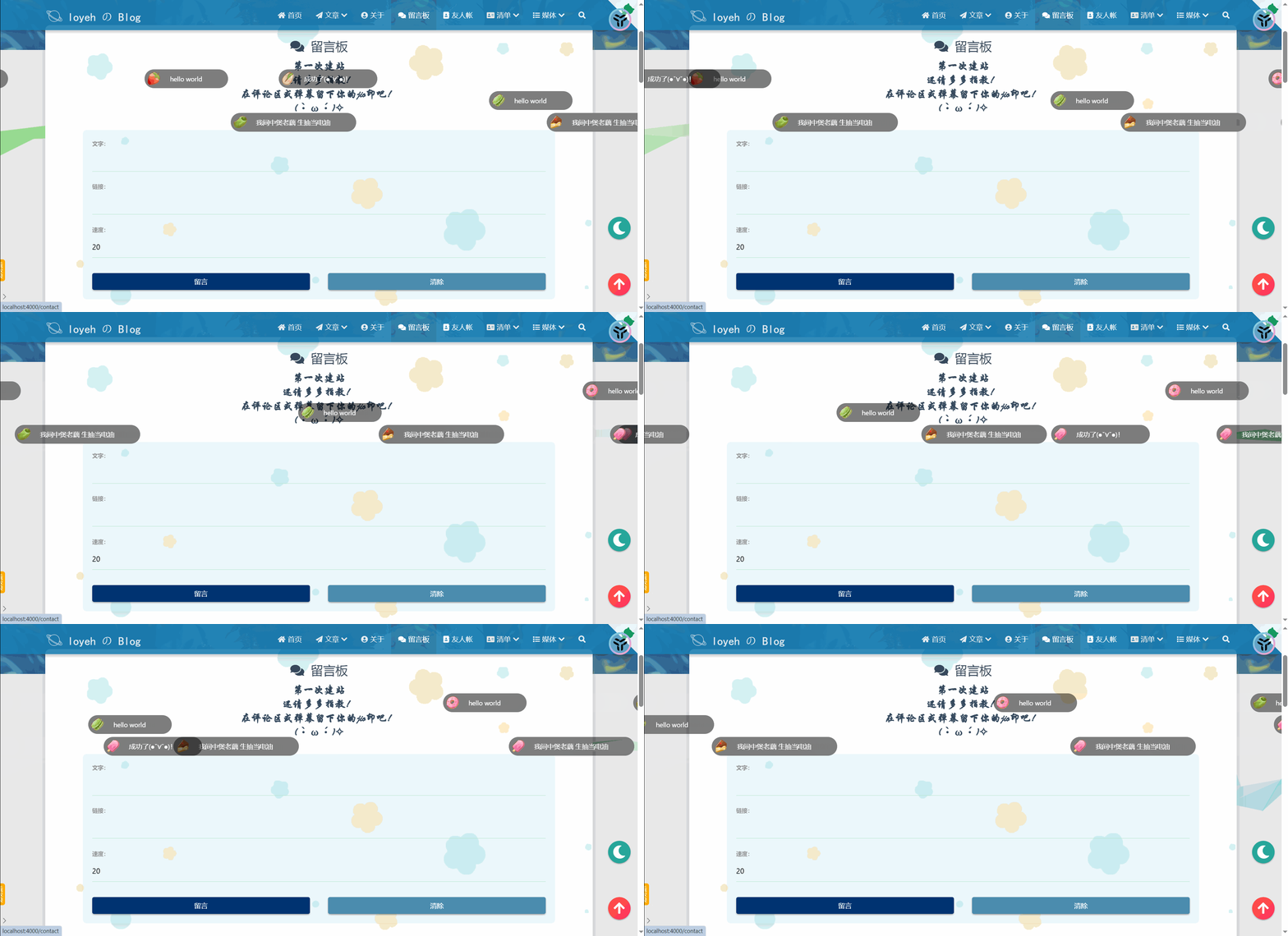
之前在一位佬的博客contact | SeaYJ’s Blog上看到了留言板上的弹幕功能,于是便想着复刻一个出来。根据大佬的提示,和评论区的原理是一样:利用LeanCloud存储,然后读取内容就可以了。至于弹幕的实现参考这位大佬的项目yaseng/jquery.barrager.js: 专业的网页弹幕插件 (github.com)
jquery.barrager.js
jquery.barrager.js 是一款优雅的网页弹幕插件,支持显示图片、文字以及超链接。支持速度、高度、颜色、数量等自定义。可以轻松集成到论坛、博客等网站中。
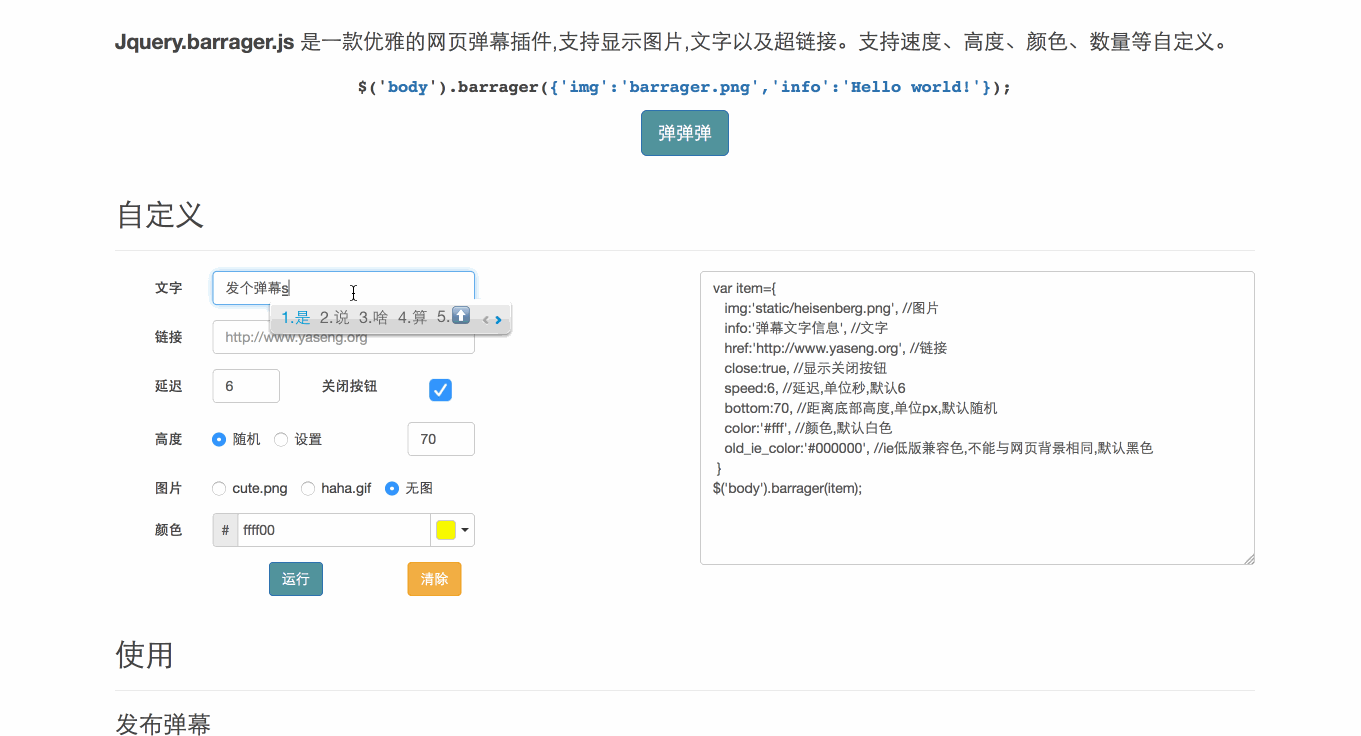
体验地址:Jquery.barrager.js 专业的网页弹幕插件 (yaseng.org)
实现的一般步骤:
下载
jquery.barrager.js插件:- 首先,你需要从 这里 下载
jquery.barrager.js插件的代码。
- 首先,你需要从 这里 下载
将插件文件放入 Hexo 项目:
- 将下载的
jquery.barrager.js文件放入你的 Hexo 项目的合适目录,例如source/js。
- 将下载的
在 Hexo 主题中引入插件:
打开你的 Hexo 主题文件(通常是
_config.yml或其他配置文件)。在合适的位置添加以下代码,以引入
1
jquery.barrager.js
插件:
1
2
3
# _config.yml
scripts:
- js/jquery.barrager.js
创建弹幕容器:
在你的 Hexo 页面中,创建一个容器用于显示弹幕。你可以在文章模板或页面模板中添加以下代码:
1
<div id="barrager-container"></div>
编写弹幕内容:
在你的文章或页面中,使用 JavaScript 来添加弹幕内容。例如:
1
2
3
4
5
6
7
8
9
10
11
12
13
<script>
// 创建弹幕对象
var barrager = new Barrager({
container: '#barrager-container', // 弹幕容器的选择器
data: [
{ content: '这是一条弹幕!', color: '#ff0000' },
// 添加更多弹幕...
],
// 其他配置项...
});
// 启动弹幕
barrager.start();
</script>
自定义弹幕样式和行为:
jquery.barrager.js支持自定义弹幕的速度、高度、颜色等属性。你可以根据需求调整这些参数。
预览和调试:
- 运行 Hexo 本地服务器,查看你的页面是否成功显示弹幕效果。
- 调试弹幕的样式和行为,确保满足你的需求。
记得在集成过程中遵循 Hexo 主题的相关规则和文档。祝你成功集成弹幕效果到你的 Hexo 博客!🎉
更详细的帮助,请查看项目文档
实现
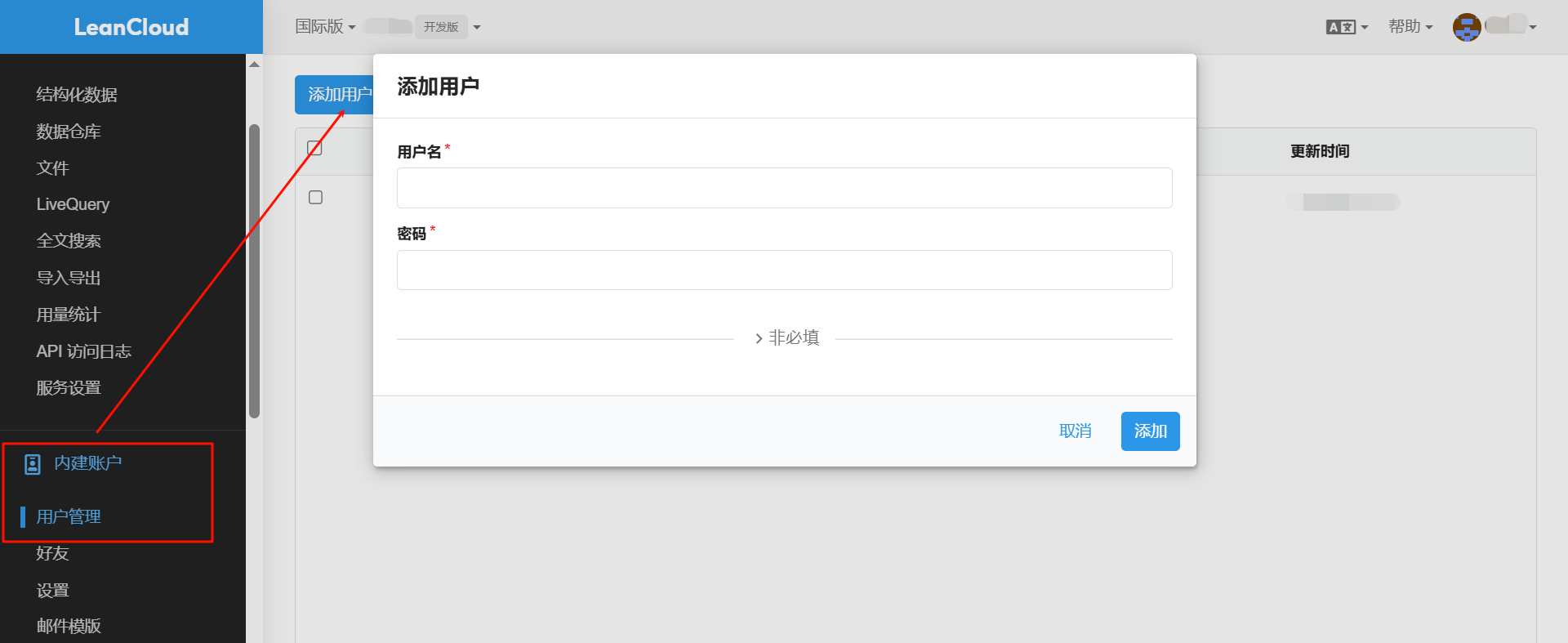
leancloud设置
添加用户
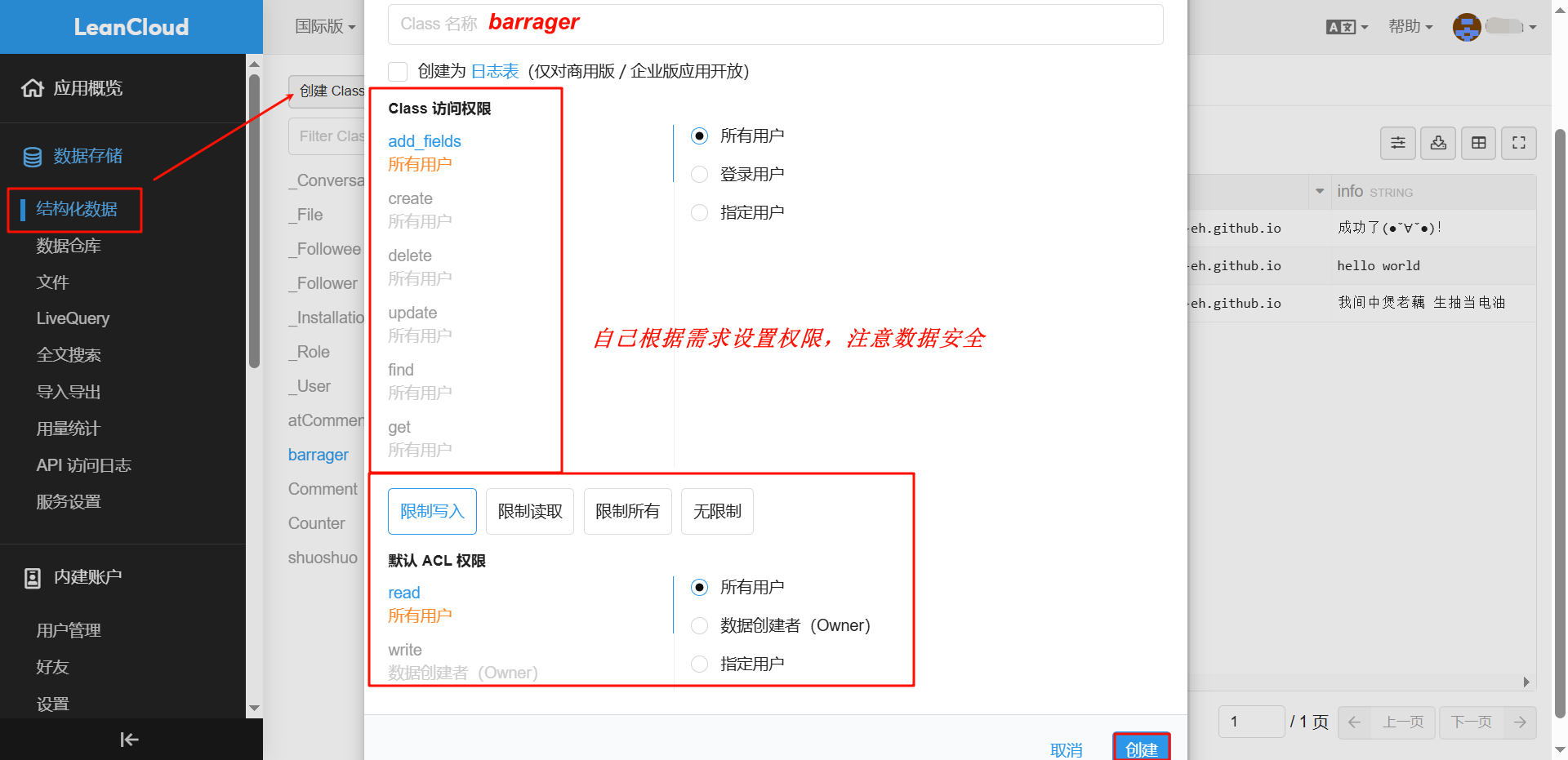
新建barragerclass
代码实现
在css下新建
barrager.css1
2
3
4
5
6
7
8
9
10
11
12
13
14
15
16
17
18
19
20
21
22
23
24
25
26
27
28
29
30
31
32
33
34
35
36
37
38
39
40
41
42
43
44
45
46
47
48
49
50
51
52
53
54
55
56
57
58
59
60
61
62
63
64
65
66
67
68
69
70
71
72
73
74
75
76
77
78
79
80
81.barrage {
position: fixed;
bottom: 70px;
right: -500px;
display: inline-block;
width: 500px;
z-index: 99;
}
.barrage_box {
background-color: rgba(0, 0, 0, .5);
padding-right: 8px;
height: 40px;
display: inline-block;
border-radius: 25px;
transition: all .3s;
}
.barrage_box .portrait {
display: inline-block;
margin-top: 4px;
margin-left: 4px;
width: 32px;
height: 32px;
border-radius: 50%;
overflow: hidden;
}
.barrage_box .portrait img {
width: 100%;
height: 100%;
}
.barrage_box div.p a {
margin-right: 2px;
font-size: 14px;
color: #fff;
line-height: 40px;
margin-left: 18px;
}
.barrage_box div.p a:hover {
text-decoration: underline;
}
.barrage_box .close {
visibility: hidden;
opacity: 0;
text-align: center;
width: 25px;
height: 25px;
margin-left: 20px;
border-radius: 50%;
background: rgba(255, 255, 255, .1);
margin-top: 8px;
background-image: url(/medias/barrager/close.png);
}
.barrage_box:hover .close {
visibility: visible;
opacity: 1;
}
.barrage_box .close a {
display: block;
}
.barrage_box .close .icon-close {
font-size: 14px;
color: rgba(255, 255, 255, .5);
display: inline-block;
margin-top: 5px;
}
.barrage .z {
float: left ;
}
.barrage a {
text-decoration: none;
}在js下新建
jquery.barrager.js1
2
3
4
5
6
7
8
9
10
11
12
13
14
15
16
17
18
19
20
21
22
23
24
25
26
27
28
29
30
31
32
33
34
35
36
37
38
39
40
41
42
43
44
45
46
47
48
49
50
51
52
53
54
55
56
57
58
59
60
61
62
63
64
65
66
67
68
69
70
71
72
73
74
75
76
77
78
79
80
81
82
83/**
*@name jquery.barrager.js
*@version 1.1
*@author yaseng@uauc.net
*@url https://github.com/yaseng/jquery.barrager.js
*/
(function($) {
$.fn.barrager = function(barrage) {
barrage = $.extend({
close: true,
max: 10,
speed: 16,
color: '#ffffff',
}, barrage || {});
const time = new Date().getTime();
const barrager_id = 'barrage_' + time;
const id = '#' + barrager_id;
const div_barrager = $("<div class='barrage' id='" + barrager_id + "'></div>").appendTo($(this));
const this_height = $(window).height() * 0.35;
const this_width = $(window).width() + 100;
const array = [
(this_height / 5) + $(window).height() * 0.5,
2*(this_height / 5) + $(window).height() * 0.5,
3*(this_height / 5) + $(window).height() * 0.5,
4*(this_height / 5) + $(window).height() * 0.5,
5*(this_height / 5) + $(window).height() * 0.5
]
const bottom =array[Math.floor(Math.random()*5)];
div_barrager.css("bottom", bottom + "px");
div_barrager_box = $("<div class='barrage_box cl'></div>").appendTo(div_barrager);
if(barrage.img){
div_barrager_box.append("<a class='portrait z' href='javascript:;'></a>");
const img = $("<img src='' >").appendTo(id + " .barrage_box .portrait");
img.attr('src', barrage.img);
}
div_barrager_box.append(" <div class='z p'></div>");
if(barrage.close){
div_barrager_box.append(" <div class='close z'></div>");
}
const content = $("<a title='' href='' target='_blank'></a>").appendTo(id + " .barrage_box .p");
content.attr({
'href': barrage.href,
'id': barrage.id
}).empty().append(barrage.info);
content.css('color', barrage.color);
const i = 0;
div_barrager.css('margin-right', 0);
$(id).animate({right:this_width},barrage.speed*1000,function()
{
$(id).remove();
});
div_barrager_box.mouseover(function()
{
$(id).stop(true);
});
div_barrager_box.mouseout(function()
{
$(id).animate({right:this_width},barrage.speed*1000,function()
{
$(id).remove();
});
});
$(id+'.barrage .barrage_box .close').click(function()
{
$(id).remove();
})
}
$.fn.barrager.removeAll=function()
{
$('.barrage').remove();
}
})(jQuery);在
contact.ejs中找到合适的位置添加1
2
3
4
5
6
7
8
9
10
11
12
13
14
15
16
17
18
19
20
21
22
23
24
25
26
27
28
29
30
31
32
33
34
35
36
37<p class="center-align">
<b>第一次建站</b>
<br>
<b>还请多多指教!</b>
<br>
<b>在评论区或弹幕留下你的jio印吧!</b>
<br>
<b>( •̀ ω •́ )✧</b>
<br>
<br>
</p>
<div class="container">
<section id="custom" class="bb-section">
<div class="row">
<div class="col-md-8 offset-md-2">
<form class="form-inline">
<div class="form-group">
<label for="info">文字:</label>
<input class="form-control" id="info" name="info" type="text" placeholder="发送一条友善的弹幕">
</div>
<div class="form-group">
<label for="href">链接:</label>
<input class="form-control" id="href" name="href" type="text" placeholder="弹幕链接,例如:https://loyeh.cn">
</div>
<div class="form-group">
<label for="speed">速度:</label>
<input class="form-control" id="speed" name="speed" type="text" placeholder="5~20" value="20">
</div>
</form>
<div class="form-group btn-group">
<button id="send" class="btn" onclick="run()">留言</button>
<button id="clear" class="btn" onclick="clear_barrage()">清除</button>
</div>
</div>
</div>
</section>
</div>在
contact.ejs末尾加入,填入自己的appId和appKey(在LeanCloud中查找)1
2
3
4
5
6
7
8
9
10
11
12
13
14
15
16
17
18
19
20
21
22
23
24
25
26
27
28
29
30
31
32
33
34
35
36
37
38
39
40
41
42
43
44
45
46
47
48
49
50
51
52
53
54
55
56
57
58<script type="text/javascript">
function run() {
let e = $("input[name=info]").val()
, n = (e = "" === e ? "hello world" : e,
$("input[name=href]").val())
, a = (n = "" === n ? "https://lo-y-eh.github.io/404" : n,
parseInt($("input[name=speed]").val()));
(20 < a || a < 5) && (a = Math.floor(10 * Math.random()) + 5);
const r = AV.Object.extend("barrager")
, t = new r;
t.set("href", n),
t.set("info", e),
t.set("speed", a),
t.save().then(e => {
$(" input[ name='info' ] ").val(""),
$(" input[ name='href' ] ").val(""),
$(" input[ name='speed' ] ").val("")
}
)
}
function clear_barrage() {
$.fn.barrager.removeAll()
}
AV.init({
appId: "",
appKey: ""
}),
$(function () {
async function do_barrager() {
let lists = [];
const query = new AV.Query("barrager")
, barrager = await query.find().then(e => {
lists = e
}
);
let length = lists.length
, index = 0;
const timer = setInterval(() => {
if (index === length)
clearInterval(timer),
do_barrager();
else {
let obj = lists[index]
, jsonObject = eval("(" + JSON.stringify(obj) + ")");
$("body").barrager({
img: "/medias/barrager/" + Math.floor(10 * Math.random()) + ".png",
href: jsonObject.href,
info: jsonObject.info,
speed: jsonObject.speed - 5
}),
index++
}
}
, 900)
}
do_barrager()
})
</script>在主题目录下的配置文件中找到
libs,在css中引入barrager.css,在js中引入barrager.js。使用hexo s参看效果调试即可。
未完成
初步构想,在评论旁边设置弹幕,可以与弹幕进行切换